How to Apply a License Key in Casengine
Follow the steps below to apply or update your Casengine license key.
Steps
Log in to Casengine as Admin
Click on Settings (⚙️ gear icon) in the top navigation bar.
Go to App Settings.
From the left-hand menu, select Key.
Click on Update Key.
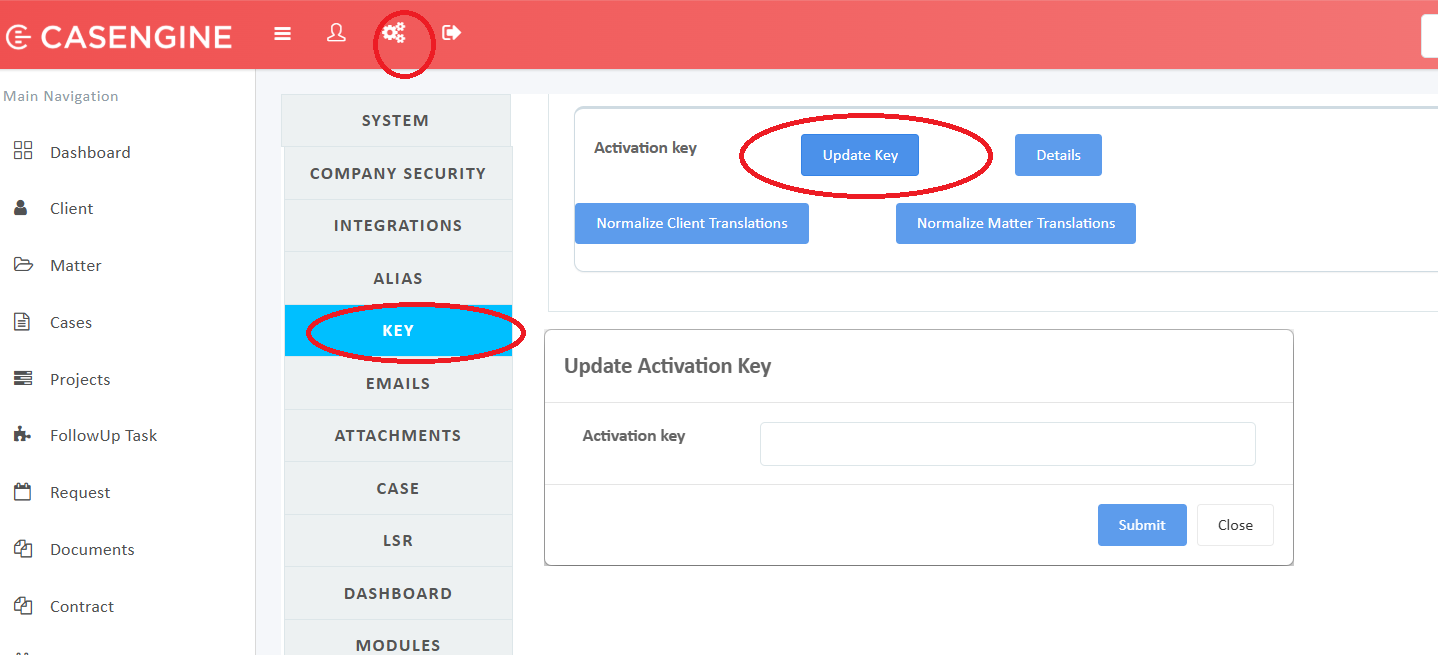
Paste the Activation Key provided to you.
Click Submit to apply the license.
Notes
Make sure you paste the key exactly as provided (no extra spaces).
After successful submission, the license will be applied immediately.
If the key is invalid or expired, please contact Casengine Support.
Was this article helpful?
That’s Great!
Thank you for your feedback
Sorry! We couldn't be helpful
Thank you for your feedback
Feedback sent
We appreciate your effort and will try to fix the article